Changing a production line means understanding how one decision affects the rest of the process. A schedule that works for one machine can create a queue at the next. A digital twin in manufacturing lets you test changes in a model of the real process before applying them on the factory floor.
The model’s value depends on how well it reflects the process behind your decision. When equipment or operating conditions change, you need to assess whether its predictions still match the plant.
This guide explains how manufacturing digital twins work and where they help with plant decisions. You’ll learn what it takes to validate a model and keep it useful as production changes.
What is a digital twin in manufacturing?
A digital twin in manufacturing is a digital model of a real machine or process that stays current with data from the plant. You use it to see how the system is running or test how a change would affect it.
The model’s purpose shapes the data it needs. Planning machine maintenance calls for data about its health, while scheduling orders calls for data on how work moves through the plant. Each model needs to capture the behavior that affects its task.
Terminology varies, so clarify what each system does when comparing a digital twin with a simulation. Compare both its data connection and how its output feeds back into a plant decision.
| Representation | Connection to the plant | Main purpose |
| Standalone simulation | Inputs selected for an analysis | Test a scenario or design |
| Digital shadow | Receives updates from the physical system | Monitor its current state |
| Operational digital twin | Uses plant data and feeds results back into decisions | Support an ongoing operational decision |
A standalone simulation answers a planning or testing question with the inputs you supply. You can use one to test a layout before installing equipment, without a permanent link to the plant.
A digital shadow receives data from the real system to show how it is running. To use that data for forecasts or tests of a change, you also need a model of how the process behaves.
An operational digital twin uses current plant data and feeds model results back into decisions through people or software. For instance, a scheduling twin needs to account for the limits that shape its schedules.
Automatic control is a separate design choice. You can use a twin’s recommendations while keeping decisions about machine commands with the responsible operator or engineer.
Digital twin use cases and benefits in manufacturing
Here’s how manufacturers use digital twins to plan maintenance, test production schedules, prepare equipment and operators, and improve process quality.
Predictive maintenance and asset health

For predictive maintenance, a twin helps you judge a machine’s condition and decide when to investigate a fault. It links plant data with a model of how the machine behaves under load.
A temperature or vibration reading needs context to show whether a machine has a fault. A higher reading could reflect a heavier load. The model needs enough data to assess that behavior so the maintenance team can decide how to respond.
The goal is to act sooner when the evidence supports it. Judge each prediction against the machine and fault patterns the model covers, with its limits in view.
Production scheduling and bottleneck analysis
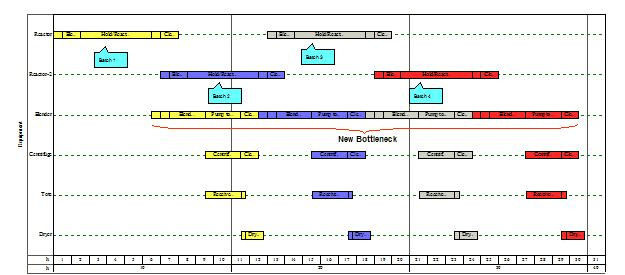
A production twin helps planners test how orders move through shared machines and find the stage that limits the line’s output. That limiting stage is a bottleneck. The model accounts for changeover time, the time needed to prepare a machine for another product, as well as space between stages of work.
Testing a schedule before changing the line helps reveal effects across connected machines. A schedule that appears efficient for one machine can create a queue at the next operation. A model of the connected process lets planners examine that effect before acting.
In a 2024 article, McKinsey reported 5 to 7% monthly cost savings from a revised assembly-plant schedule supported by a factory twin. The revised schedule reduced overtime needs. The twin used plant and inventory data within delivery and storage constraints. That was a reported result for one operation.
Virtual commissioning and operator training

Virtual commissioning tests control software against a model before the real equipment goes into use. A programmable logic controller (PLC) runs the logic that directs machine behavior. Engineers connect that logic to simulated equipment to test sequences and responses to faults before installation.
Operator training lets staff practice situations they need to handle. They can rehearse a startup or a fault without taking the production line out of service.
The task determines how much detail you need. A model for testing control sequences needs to reproduce the relevant equipment responses. For training, it needs to make the selected exercises realistic. A model for tuning a process also needs evidence that it represents the physical behavior under test.
Quality control and process optimization

A process twin supports quality work by comparing expected results with plant data. Engineers use it to assess how process settings relate to the result they want to improve.
Investigate a gap between expected and observed results. Its cause could lie in the process or incoming data, or in the model itself. Tracing the cause helps you avoid treating a model error as a production defect.
How manufacturing digital twins work
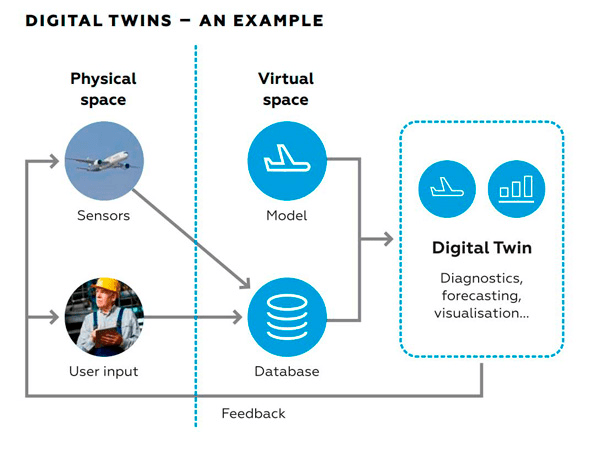
A manufacturing digital twin uses plant data to keep a process model up-to-date. The data needs to identify the asset it came from and when the plant recorded it.
Sensors measure physical conditions, while PLCs expose equipment states and control information. Networked devices that share these observations form part of the Internet of Things (IoT). Through digital twin and IoT integration, the model receives these device readings.
The model needs data with clear labels and measurement units. A data historian stores process readings over time so engineers can review how conditions changed. Other data services group readings and link them to the right machine.
A data field holds a value, such as a temperature reading or equipment state. Control systems often call these fields tags. A field mapping specifies which incoming field supplies a model input. Measurements need their units recorded so users can interpret the values.
Plant and business systems supply the production context. A manufacturing execution system (MES) tracks work on the factory floor. An enterprise resource planning (ERP) system manages business information such as orders and inventory. You use system integration to feed a scheduling model with the plant and business data it needs. A focused equipment model needs only the feeds that support its task.
Data timing affects what each result means. A reading delivered late still describes the earlier condition it captured. Values you work out from several readings also depend on the time between them. For example, speed calculated from changes in position depends on the elapsed time.
The model calculates a result from those inputs based on how it represents the process. A user interface shows the output so the person using it can judge a recommendation or investigate an unexpected result.
How to validate a manufacturing digital twin
Digital twin validation tests whether a model is fit for its task. You need evidence that its outputs are reliable in the plant conditions where you plan to use it.
Set validation criteria for the intended use
Start validation with the decision you want to make. For a production-flow model, that means representing the conditions that affect flow. For an operator-training simulator, it means reproducing the behavior staff needs to practice.
Model fidelity describes how closely a model matches the real behavior that matters for its task. More detail adds work, so focus on the parts that affect the decision. Detailed equipment geometry cannot make up for missing assumptions about product changeovers.
Acceptance criteria state what the model must show to be fit for use. Write them before you judge the result. For a scheduling model, they should cover the planning outputs and plant conditions you will use. Each type of twin needs criteria suited to its task.
The evidence needs to identify the conditions you tested. Data collected for one product family supports conclusions about those conditions. A production recipe specifies the process settings used to make a product. A different recipe or machine setup needs its own assessment.
Compare model outputs with plant data
Plant records give you a basis for comparing the model with the process behavior you want to assess. Those records need enough context to show when and how the plant captured the observations.
Input errors can make a sound model appear inaccurate. A wrong equipment label or unit changes what a measurement means. Missing values and recording times also affect which plant conditions the inputs represent. Establish what the data describes before changing the model.
Verification and validation answer different questions. Verification asks whether the model’s builders followed its design. Validation asks whether it matches the real process well enough for the task. Uncertainty reflects both gaps in knowledge and variation in the data or process. Explaining uncertainty helps users judge how to act.
Test across the plant conditions in which you plan to use the model. Keep the data you use to judge it separate from the records you used to tune it. This helps you assess performance beyond the records that shaped the model.
For a twin that learns patterns from data through machine learning, use separate training, validation, and testing data. Training data fits the model, while validation data guides tuning. Reserve test data for a final assessment of predictions. Those data splits support the wider work of validating the twin for its manufacturing task.
If a result falls outside the acceptance criteria, investigate the cause before adjusting model settings. A data-transfer fault calls for a different correction than an incorrect assumption about process behavior.
Document validation results and model limitations
A validation record helps people who did not build the model judge its output. It connects the result with the exact model and plant conditions you assessed.
A manufacturing digital twin validation record should include:
- The intended decision: what the output helps someone decide.
- Equipment and model versions: which physical setup and model you assessed.
- Reference observations: which data you used and when the plant collected it.
- Test conditions and results: what you assessed against the acceptance criteria.
- Limitations: which conditions remain outside the evidence.
- Responsibility: who decides whether the result supports continued use.
Adapt this working record to the model’s task and any applicable requirements. If the evidence does not support a recommendation, make that status visible and refer the decision to the responsible engineer or operator.
How to keep a manufacturing digital twin accurate
A manufacturing digital twin needs ongoing maintenance to reflect changes in the plant. The sections below explain who is responsible for the model and how to assess changes before updating and revalidating it.
Assign ownership and track model versions
Responsibility for the model continues after the initial project ends. Control engineers understand changes to machine logic, while process specialists understand production assumptions. Data teams manage the interfaces that deliver measurements. Whoever coordinates model updates needs input from each group to decide which assumptions or data connections need to change.
A version record links the model in use to the equipment setup it represents. It also points to the validation evidence for that combination. Users can use that evidence to trace which results support their task.
Make the model’s current status visible while you assess a plant change. Users need to know which operating conditions its team has evaluated and which still need evidence.
Identify plant changes that require model review
A plant change requires attention when it affects data or behavior the twin uses. Cycle time is the time a machine needs to complete one operation. A timing change matters if the model still uses the old cycle time. The table is a starting point for deciding what to reassess and who should do that work.
| Plant change | What to revisit | How to test it | Responsible team |
| Sensor or data-timing change | Units, mappings, and recording times | Compare inputs with reference observations | Automation and data teams |
| PLC sequence or cycle-time change | Equipment states and timing assumptions | Repeat affected behavior tests | Controls and process teams |
| Equipment, layout, or capacity change | Material routes and production limits | Evaluate affected flow or capacity | Manufacturing engineering |
| New recipe outside tested conditions | Process assumptions and operating limits | Assess whether existing evidence still applies | Process and model owners |
| Persistent prediction mismatch | Inputs, configuration, and model behavior | Investigate and reassess affected outputs | Model owner and plant specialists |
Sensor and timing changes affect how the model interprets its inputs. After replacing a sensor, the automation and data teams need to establish whether its unit or recording interval has changed. That tells them whether the new values remain suitable inputs for the model.
PLC sequence changes affect the order or timing of equipment actions. Controls and process teams need to test the changed behavior alongside important functions that should remain intact. These tests help reveal unintended effects elsewhere in the sequence.
Equipment and layout changes alter the physical relationships the model represents. A production-flow model needs to reflect a changed route or capacity limit before planners use it to assess the revised line.
New recipes require you to reassess the model’s operating limits. For example, in a hypothetical packaging line, a new format changes the machine cycle time. Before using the existing model to promise output for that format, the process owner establishes the new behavior. The model team then tests how well the model represents those revised conditions.
Diagnose persistent prediction mismatches before you adjust the model. The response depends on whether the cause is a sensor fault, an outdated setup, or a flawed process assumption. Tuning the model to match suspect data risks hiding the original problem.
Update, revalidate, and release the model
An update record should explain what changed and why the model is ready for use again. Link the affected equipment or data interface to the model assumptions and outputs you need to reassess.
The model team updates those parts and repeats the relevant validation work. Regression tests assess software behavior that should remain unchanged after an update. These tests complement the comparisons with plant behavior needed to validate the model.
The release should identify the revised version and include its test results and remaining limits. Users need that information to judge whether it supports their task. Keeping earlier model versions with their setup records gives the team a way to investigate unexpected results.
The maintenance plan needs to explain when to reassess the model. Routine use within tested conditions calls for a different response from a change outside those conditions. Set review intervals around how you use the model and how quickly the process changes.
How to implement a digital twin in manufacturing
Start with a pilot, a small first project that tests whether the twin is useful for your task. Use it to try one decision and learn what it takes to keep the model current.
- Choose the decision and establish a baseline. Identify the asset or line involved and the result you want to improve. Set acceptance criteria for the model and measure the current process so you have a basis for judging what changes.
- Connect the required data and build the model. Establish what information you have and what you need to add. Keep model detail tied to the task. Address a missing equipment state if it changes the result, and assess visual features against a practical need.
- Validate the result and assign continuing responsibility. Use the acceptance criteria to decide whether the model supports the pilot task. Before expanding its use, establish who handles equipment changes and who maintains the data connections.
- Measure value alongside the work required. Compare the outcome with the baseline. Track the effort spent on integration and model development. Include validation and continuing maintenance so the expansion decision accounts for work after launch.
Expand a manufacturing digital twin only when users act on results validated for the intended conditions and the value justifies ongoing maintenance. That decision should account for data access, integration, and testing effort. Virtual commissioning shifts some work away from the plant, so assess time on site separately from total engineering effort. If a standalone simulation already answers the pilot question, add live connectivity only when it serves a clear operating need.
Final Thoughts
Digital twins let manufacturing teams explore a change before committing to it on the factory floor. Keeping that advantage depends on maintaining a model that reflects the process it supports.
Start with a production decision your team understands and a result you can measure. A focused pilot gives you a way to compare the model with plant behavior. The pilot is also the time to establish who will keep the model current as equipment or process conditions change.
If your pilot needs data from machines and plant systems, our manufacturing software engineering work at Eastgate Software connects those systems. We map the data flows with your plant team before building the links. We then test those links against the conditions they will face on the line.